Divi Accessibility Fixer DS
Find accessibility issues inside the Divi 5 Visual Builder, jump to the exact module and fix them in Divi's own settings.
$49 Unlimited sites, 1 year of updates and support
Buying on divistation.com is coming soon.
Highlights
-
Go straight to the module
Click an issue to select the module and open the settings group where it's fixed.
-
Fixes in Divi's own settings
One-click and guided fixes for headings, alt text, labels, link text and contrast, with undo.
-
The whole site at a glance
Automated check score per page, site checks, Theme Builder layouts and an alt text screen.
-
Reports and statement
Branded printable and CSV reports, and a guided accessibility statement for your clients.
Find and fix accessibility issues on the exact Divi module
Divi Accessibility Fixer DS checks your Divi 5 pages against WCAG 2.2 level A and AA, shows each issue on the module that has it, and helps you fix it in Divi’s own settings, with one click or a short guided form. For agencies building client sites and for site owners working towards the European Accessibility Act.
How it works
- Check a page from the WordPress dashboard, or open the Accessibility Fixer panel in the Visual Builder.
- Go to the module. One click selects it, opens its settings on the right tab and group, and outlines it on the page.
- Fix it with one click or a short form, then save the page. Every fix can be undone.
Fixes, saved in Divi’s own settings
Every fix writes the same module setting you would change by hand, so your page stays normal Divi content. Nothing changes until you save the page.
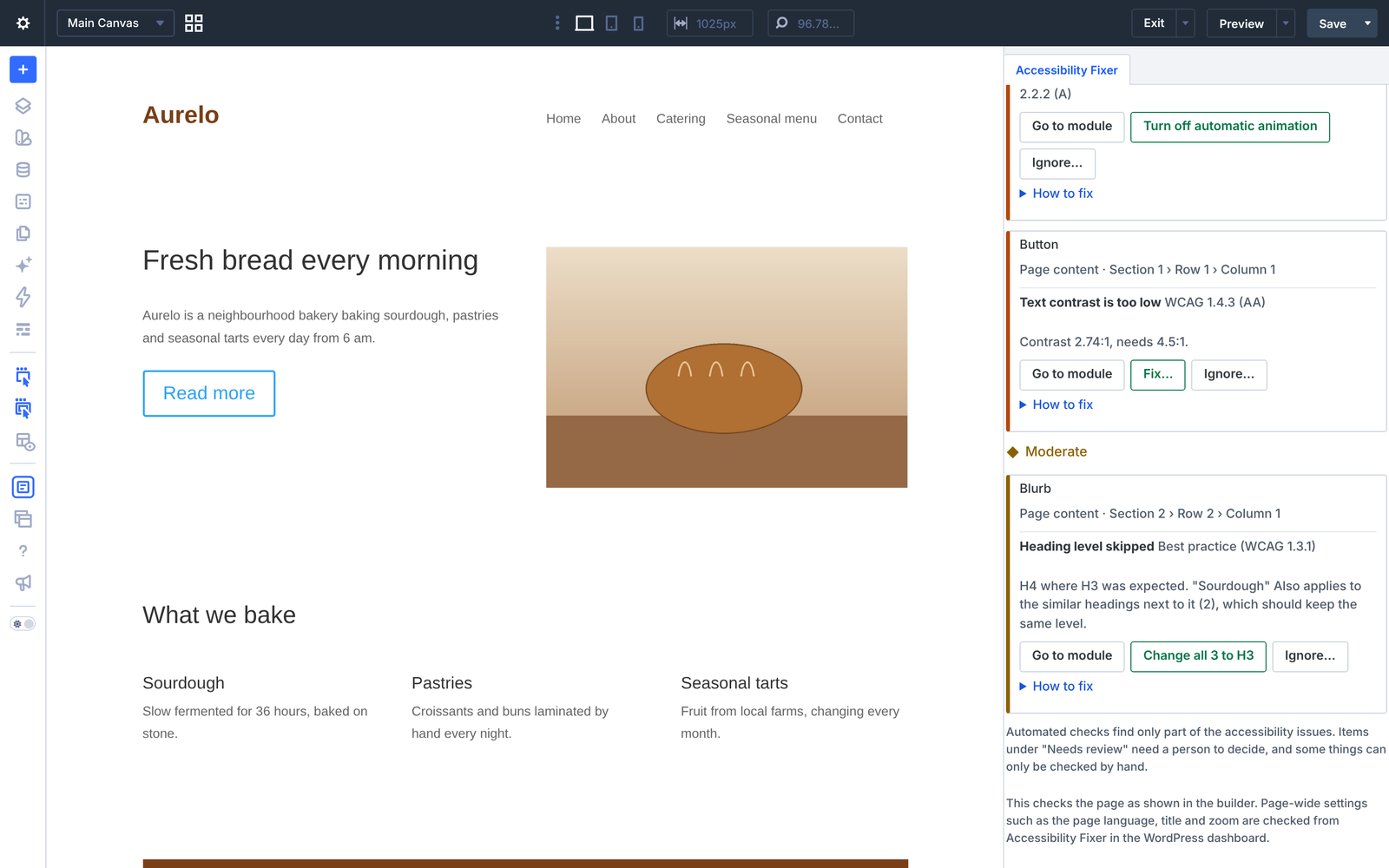
- Heading levels: “Change to H3” on about 35 Divi modules. A row of similar headings, such as three Blurb titles, is fixed together.
- Alt text from the Media Library: Divi copies alt text only when an image is chosen. One click brings in the Media Library text.
- Alt text: describe the image in the panel, with a preview, and save it in the Media Library too. Or mark the image as decorative.
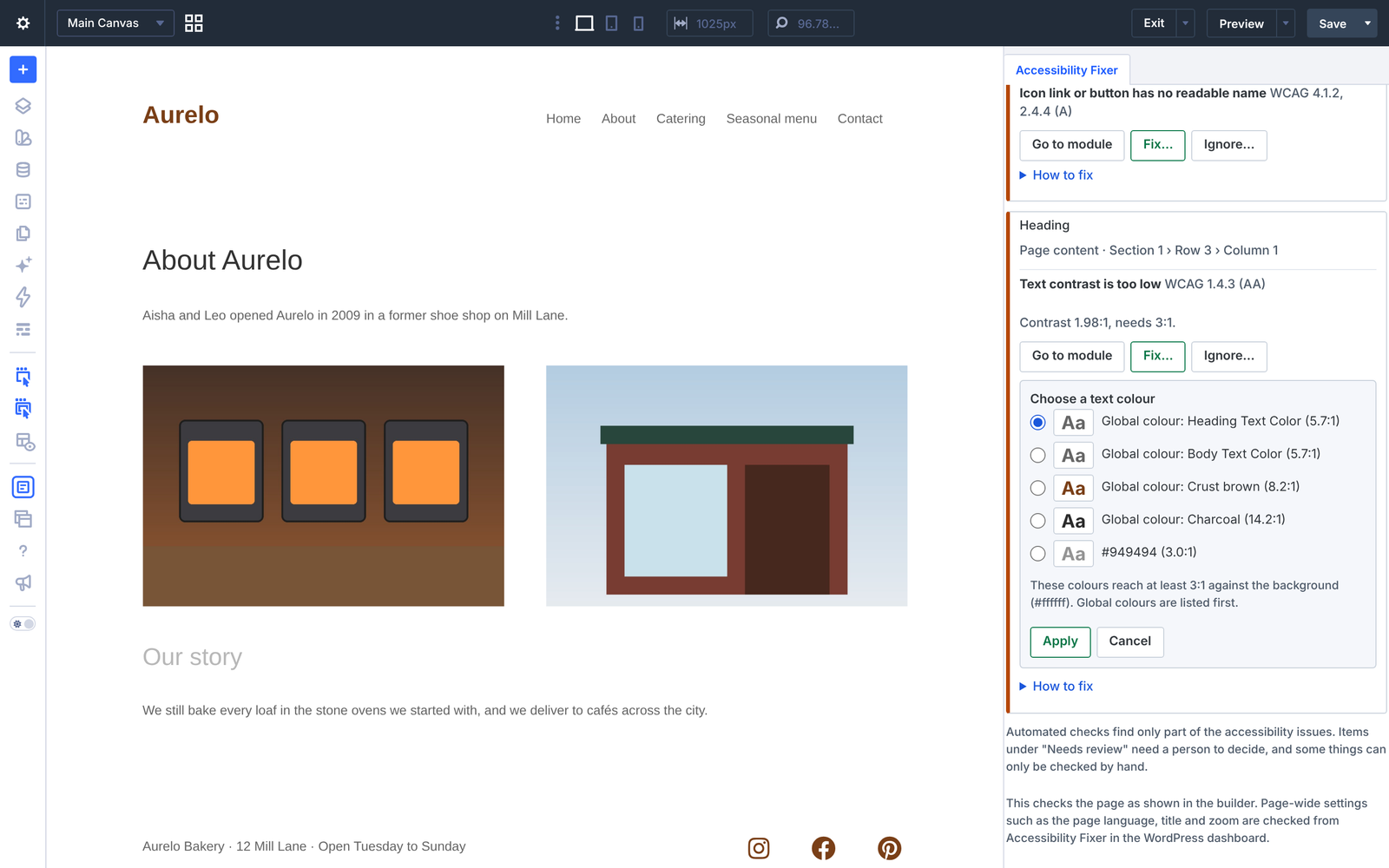
- Colour contrast: passing text colours for Heading, Button and Text modules, your global colours first, each with its contrast ratio and a preview.
- Labels for icon links, social icons and buttons with no readable name, with a suggestion filled in.
- Vague link text such as “Read more” on buttons: new text, or a label for screen readers.
- Automatic slides turned off on sliders and carousels, and field labels shown on Contact Forms.
Every other issue comes with “How to fix” in Divi terms and a “Go to module” button.
Built for Divi
- Issues on the module: “Image: Meadow photo · Page content · Section 1 › Row 2 › Column 1”.
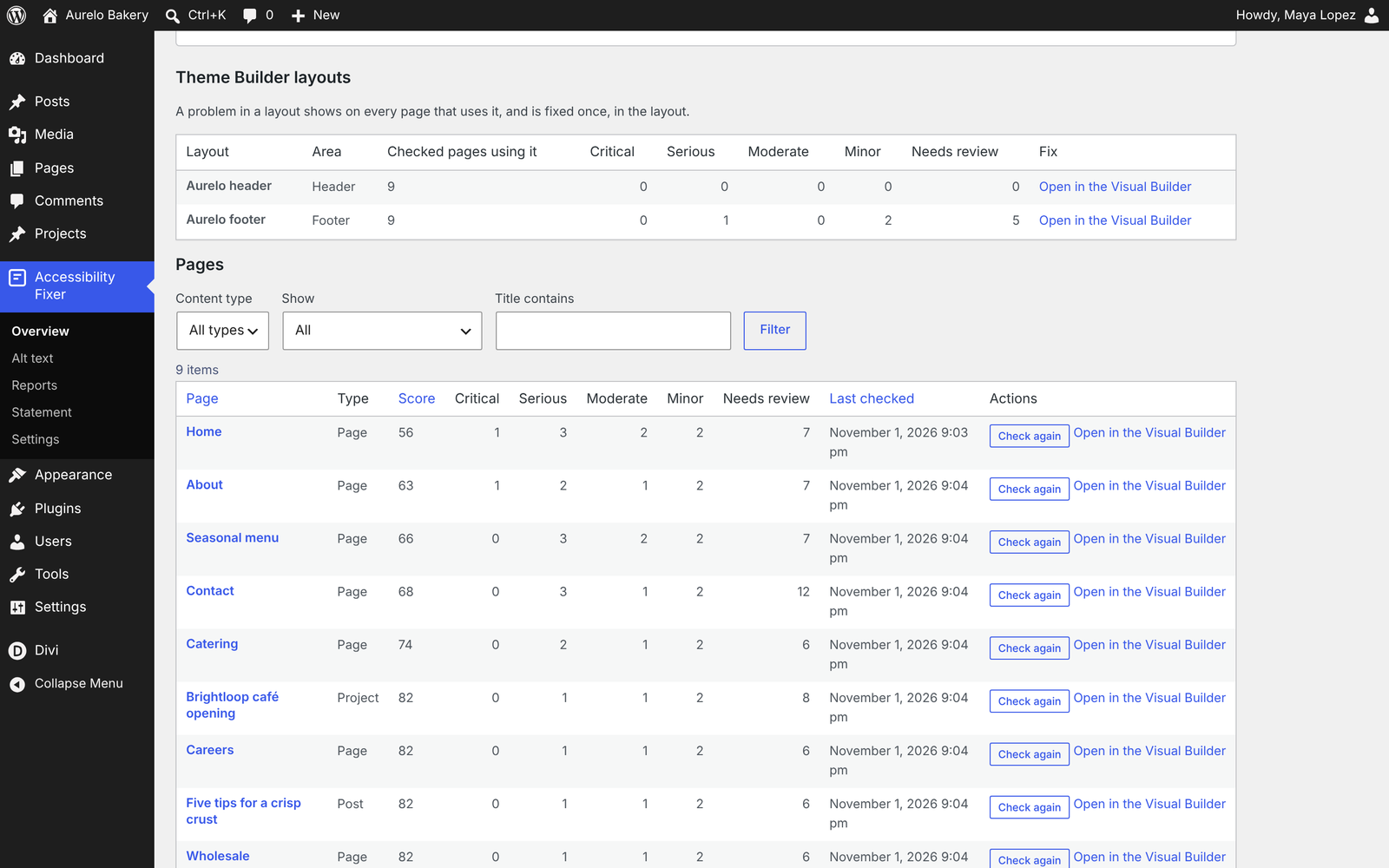
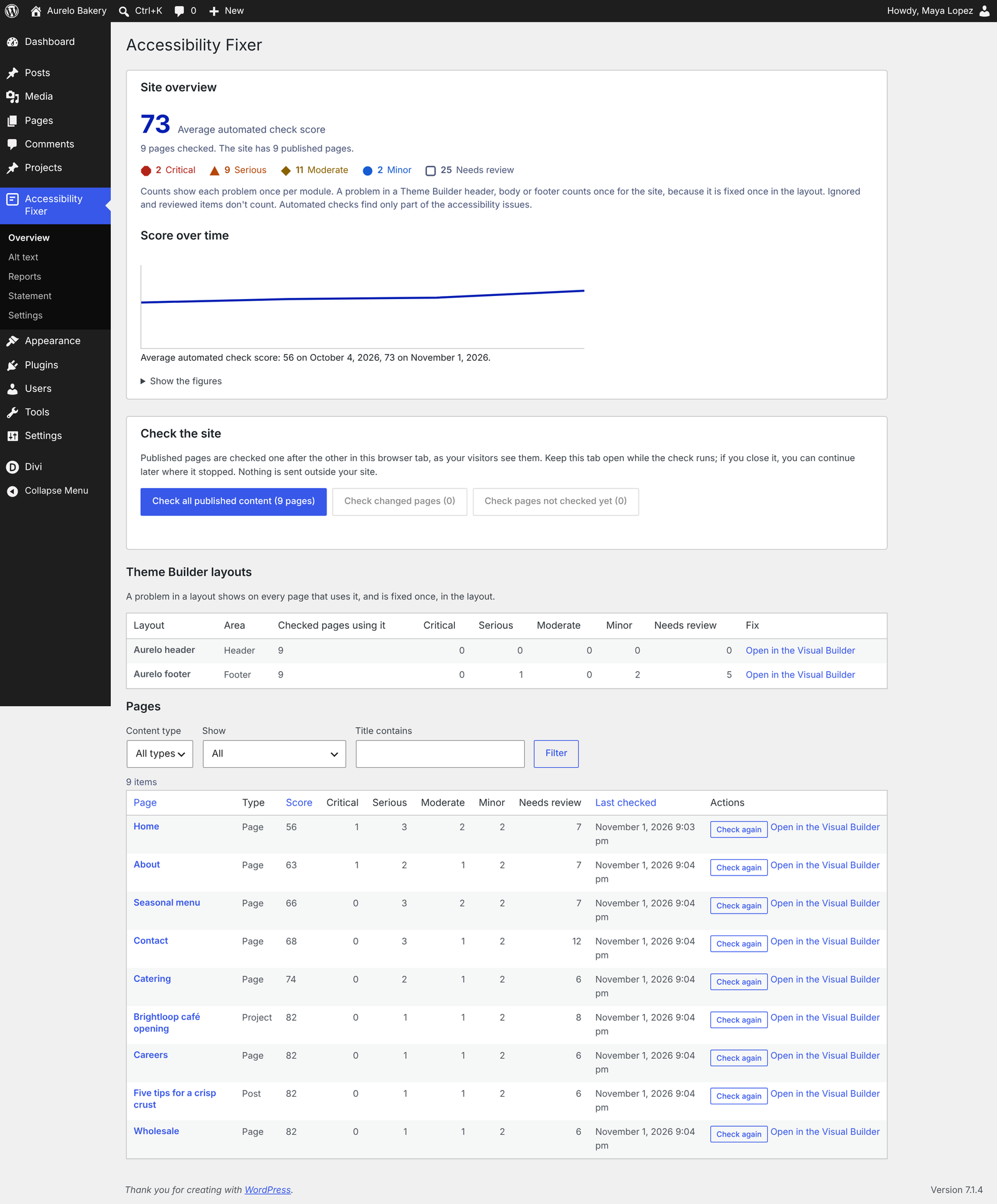
- Theme Builder: issues in a global header or footer show on the page, are counted once for the site and fixed once, in the layout.
- 21 Divi-specific checks on top of the WCAG rules, for problems common on Divi sites: Image modules missing their alt text, icon-only links and buttons, automatic sliders, placeholder-only form fields, text on background images, sticky headers hiding the keyboard focus, content too wide for phones and more.
- Checks again while you edit, about 1.5 seconds after your last change.
- A panel you can move, resize and dock like Divi’s own, in Divi’s light and dark interface.
The whole site at a glance
- Dashboard: an automated check score for every page, post and project, worst first, problems by severity and the score over time.
- Site checks: check all published content, only changed pages, or pages not checked yet, with progress and the option to stop and continue later.
- Background check of the saved content every hour, for missing alt text and automatic sliders.
- Fix in the Visual Builder: every issue links straight to the builder, with the panel open at that issue.
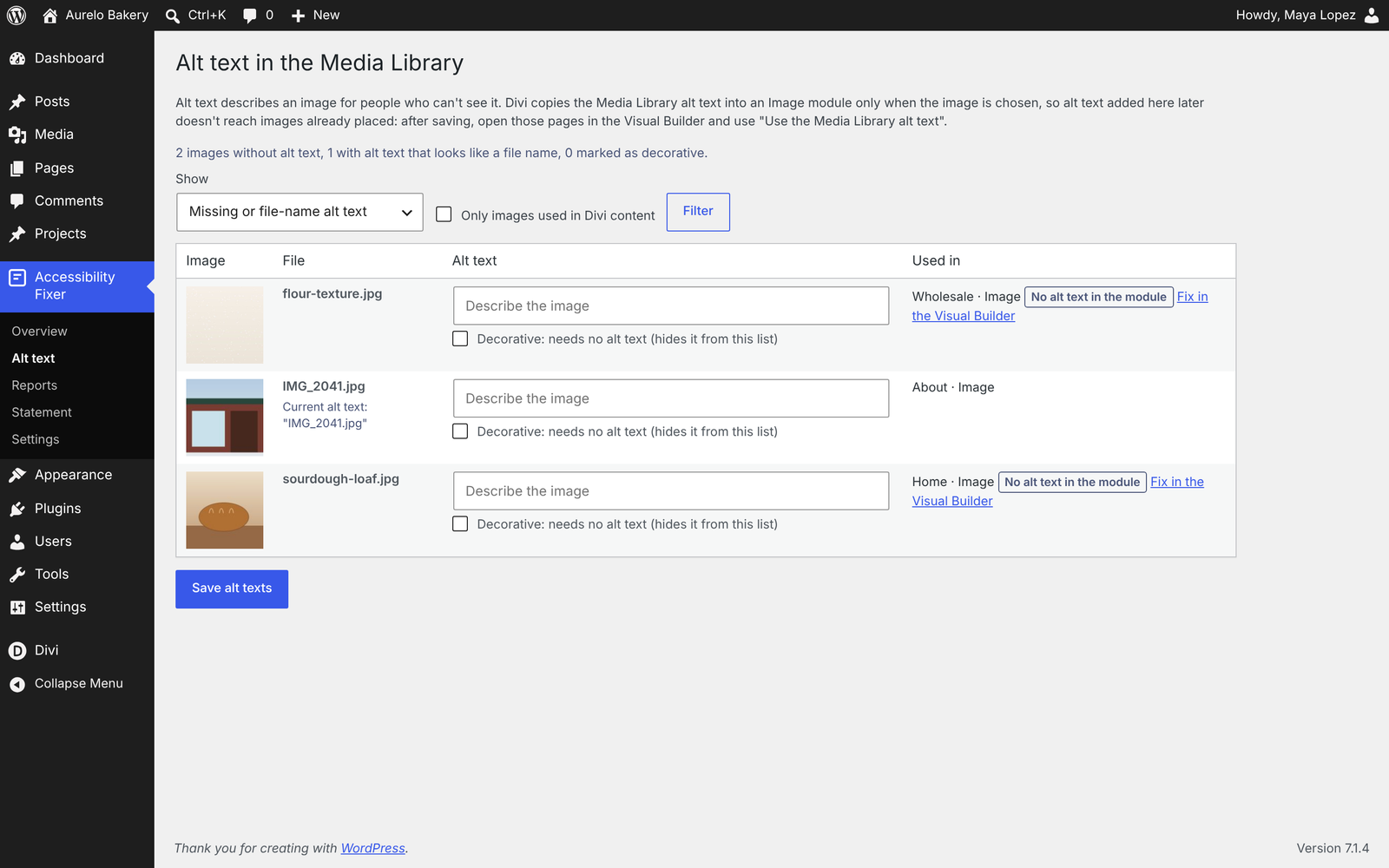
- Alt text screen: every Media Library image without alt text, with where it’s used. Edit them in one list and save them together.
- Ignore or mark as reviewed with a reason and a note, shared between the builder and the dashboard, always restorable.
For agencies: reports and statement
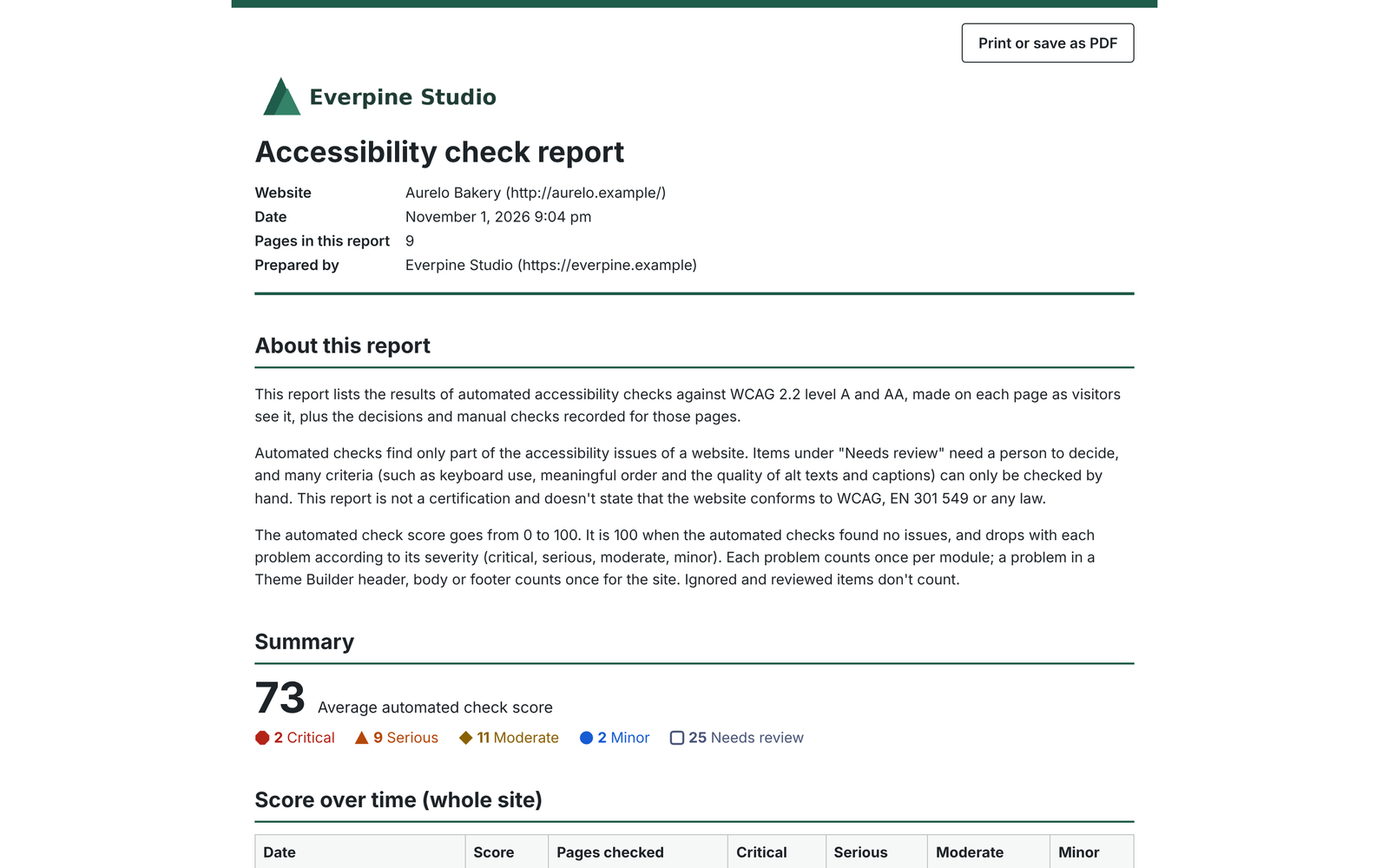
- Branded reports with your name, logo and colour: a printable report to save as PDF, and a CSV with one row per element. White label: remove the plugin mention with one checkbox.
- Reports can include Theme Builder layouts, the score over time, ignored and reviewed items with reasons, fixes made and manual check results.
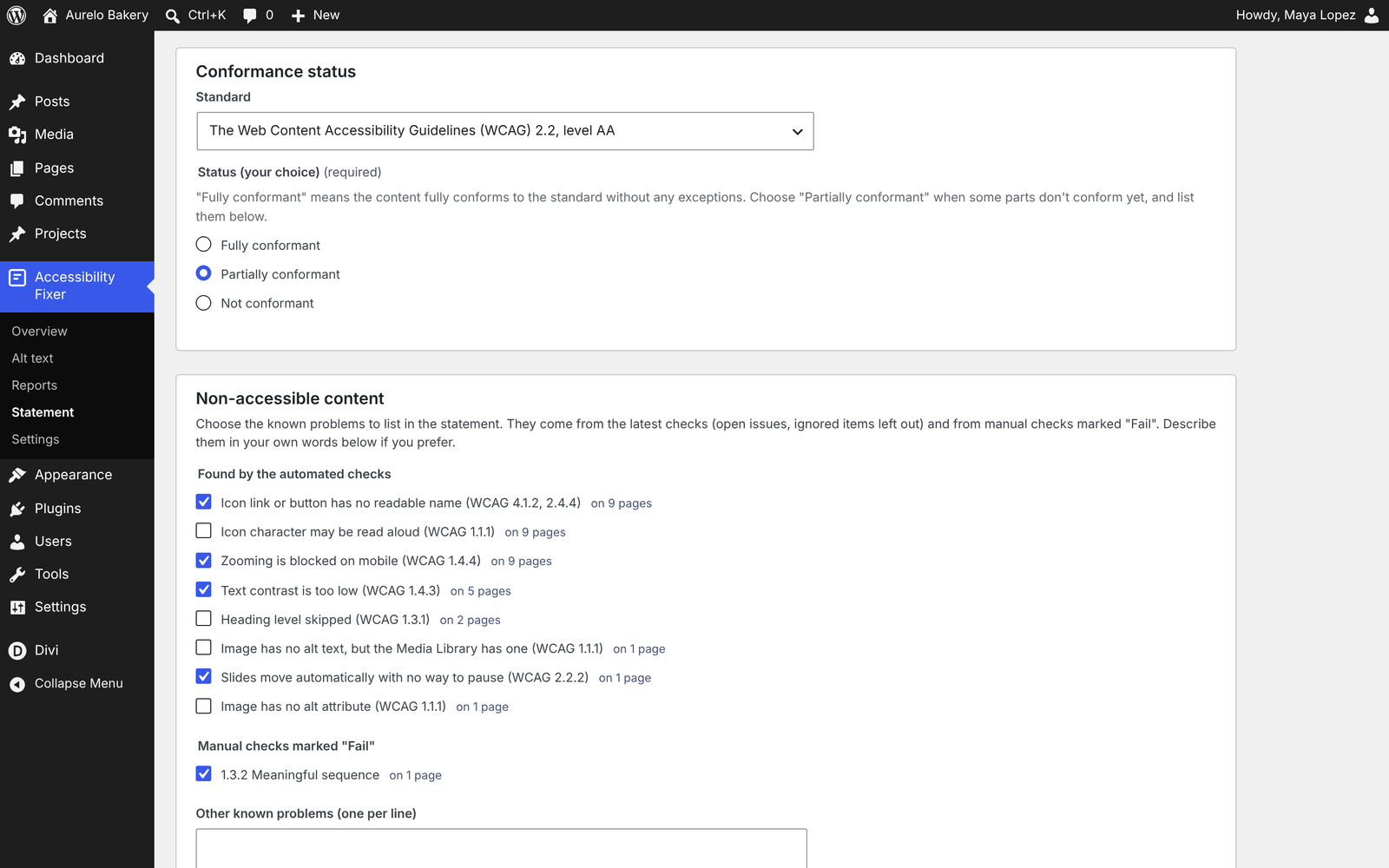
- Accessibility statement: a guided form following the EU model statement, with known problems ticked from your latest checks. It creates a draft WordPress page for you to review and publish.
- Fix history: who fixed what and when, on each page.
Honest about what automation can do
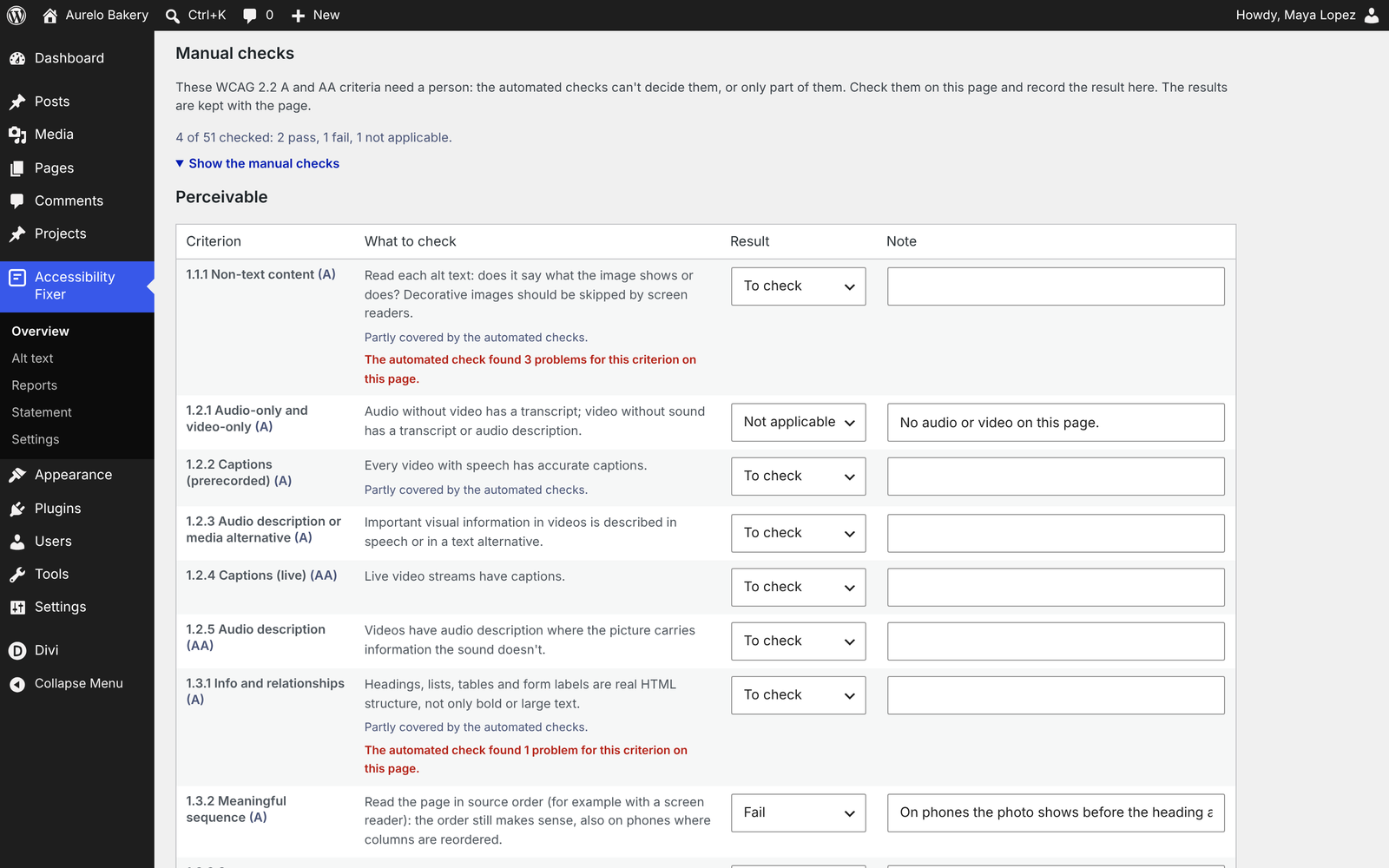
Automated checks find only part of the accessibility issues on a page. So the plugin keeps a separate Needs review list for what a person has to decide, and gives every page a manual checklist of the 51 WCAG 2.2 A and AA criteria that automated checks can’t fully decide, with a place to record Pass, Fail or Not applicable. The score is called the automated check score, and every report says it isn’t a certification.
Private and light
- Nothing is sent outside your site. Checks run in your browser; results stay in your database.
- Visitors load nothing from the plugin, unless you turn on an optional enhancement. No visitor toolbar.
- Administrators only by default, with its own capability.
- The plugin’s own screens, panel and reports pass an automated WCAG 2.2 AA check.
- Deleting the plugin removes its tables, settings and capability.
Optional extras
Off until you turn them on: a “Skip to content” link, a clear keyboard focus outline, zooming allowed on phones, reduced motion for visitors who ask for it, and underlined links in text. No JavaScript for visitors. You can also show a warning after saving a page that has critical issues.
What’s included
- The plugin.
- Full documentation: divistation.com/documentation/divi-accessibility-fixer-ds
- Support through Divi Marketplace tickets and the DiviStation support forum.
Good to know
- The plugin helps you find and fix problems and work towards WCAG 2.2 AA. It doesn’t certify a website or make it conform to WCAG, EN 301 549 or any law on its own.
- Fixes are made in the Visual Builder, one page at a time; the dashboard links straight to each issue.
- Site checks run in your browser tab, about 3 to 5 seconds per page: keep the tab open, or continue later.
- Contrast fixes cover Heading, Button and Text modules; for other modules, “Go to module” opens the settings to change the colour.
- The warning after saving never stops a page from being saved or published.
- Version 1.0.0 is tested in Chromium-based browsers such as Chrome and Edge.
Requirements
- Divi
- 5.14 or later
- WordPress
- 6.5 or later
- PHP
- 7.4 or later
Documentation
Step-by-step guides for every module and setting, with screenshots, troubleshooting and FAQ.
Support
Open a ticket on the Divi Marketplace, or use the support in your DiviStation account.
Frequently asked questions
Will this make my website compliant?
No plugin can do that on its own. Automated checks find only part of the accessibility issues. Divi Accessibility Fixer DS helps you find and fix them, shows what needs a person to decide and gives you a manual checklist for the rest. For a formal evaluation, ask an accessibility expert.
Does it add a toolbar or widget for visitors?
No. Fixes are saved in your Divi content. Visitors only get the optional enhancements you turn on: a small style sheet and, for the skip link, one link.
Does it change my pages automatically?
No. Nothing changes until you apply a fix and save the page in Divi. The optional enhancements are off until you turn them on.
Which Divi version do I need?
Divi 5.14 or later. It doesn't work with Divi 4.
Does it check Theme Builder headers and footers?
Yes. Problems in a layout are shown on the pages that use it, counted once for the site, and fixed once in the layout.
Can I give reports to my clients?
Yes. Add your name, logo and colour in Settings, untick the plugin mention for white label, then save the report as a PDF or download the CSV.
Changelog
Version 1.0.0
- Initial release. Requires Divi 5.14+, WordPress 6.5+, PHP 7.4+.
- Page checks against WCAG 2.0, 2.1 and 2.2 level A and AA, plus 21 Divi-specific checks.
- Accessibility Fixer panel in the Visual Builder: issues by module, Go to module, check again while editing.
- One-click and guided fixes written to the module's own Divi settings, with undo.
- Ignore and mark as reviewed, with reasons and notes.
- Site dashboard: automated check score, site checks, Theme Builder layouts, fix history, manual checks.
- Alt text screen for Media Library images.
- Branded reports (printable/PDF and CSV) and accessibility statement generator.
- Optional site-wide enhancements (off by default) and a warning after saving pages with critical issues.
Get Divi Accessibility Fixer DS
Find accessibility issues inside the Divi 5 Visual Builder, jump to the exact module and fix them in Divi's own settings.
$49 Unlimited sites, 1 year of updates and support
Buying on divistation.com is coming soon.